6 min read
What Are Die-Lines and 3D Mockups in Packaging Design?
Learn how to turn a packaging idea from a 2D technical layout (die-line) into a realistic 3D mockup and a print-ready physical product.
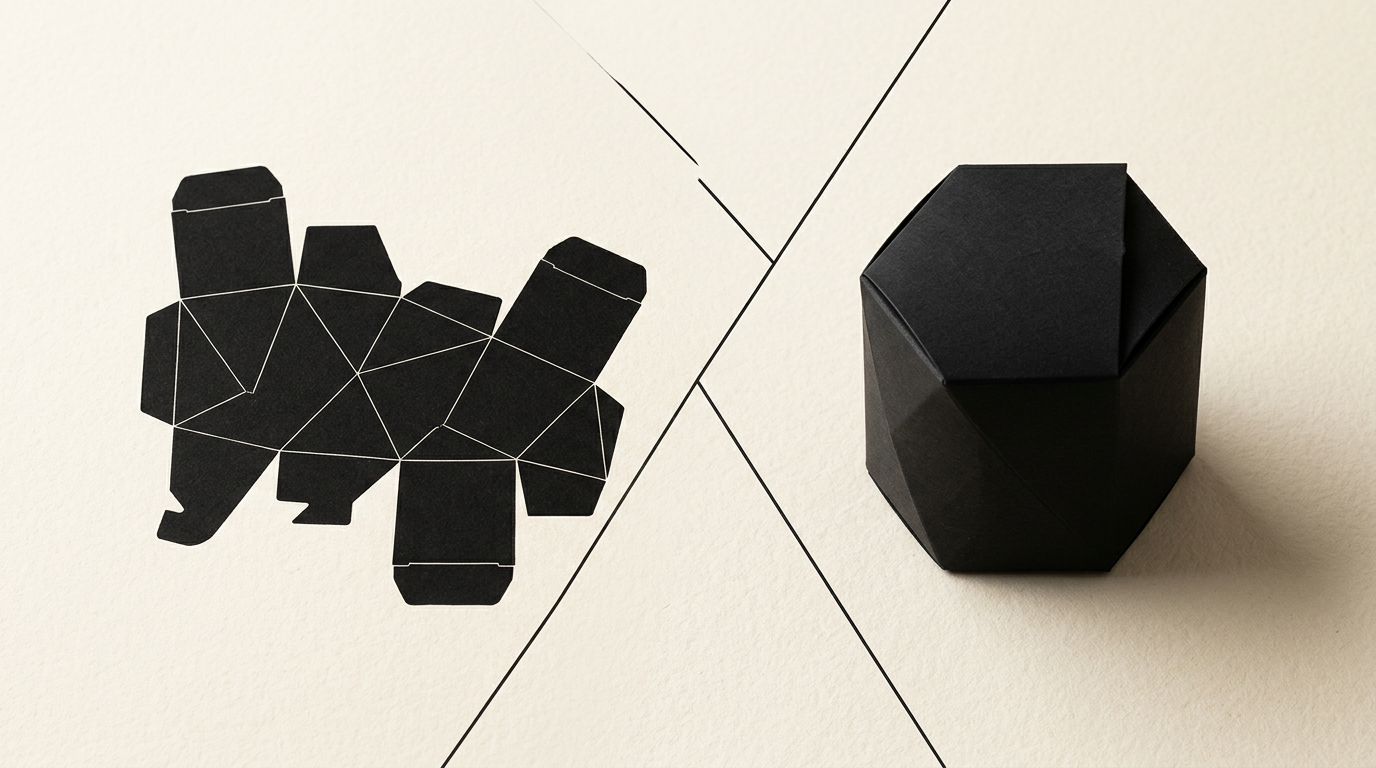
Transitioning from a graphic concept to a physical package on a retail shelf requires technical precision and thorough planning. Without a clean vector file (die-line) and a accurate three-dimensional visual simulation (mockup), the risk of encountering costly printing errors is huge. In this article, I explain exactly how we transform a technical layout into an impeccable finished product.
What exactly is a die-line and why is it mandatory for packaging?
A die-line is the two-dimensional technical template of a package, showing the exact cut, crease, and glue lines. It acts as a technical map for printing equipment and prevents visual element misalignment. When I manage a design grafic project for packaging, the die-line serves as the foundation upon which we lay all brand elements. Without it, a printing press cannot know where to cut 300g cardstock or where to place fold lines. A technical error of just 1 mm can result in misaligned joints and 5,000 ruined boxes. That is why the file is created at a 1:1 scale using clean vectors and Spot Colors set to Overprint, allowing the print shop to separate technical lines from printed artwork.
What is the difference between a vector die-line and a 3D mockup?
The die-line is the flat technical blueprint used by the print shop, while the 3D mockup is a photorealistic simulation of the assembled package. To better understand how they complement each other, here are the key differences:
- The Die-line: A 2D vector file (AI or PDF) containing cut lines (red), fold lines (dashed), and glue zones (hatched). It is meant exclusively for production machinery.
- The 3D Mockup: A three-dimensional image or photorealistic rendering (PSD or 3D model) created for presentation and visual validation.
During the development of a complete identitate vizuală, the mockup helps you see how the final product sits on the shelf, how text reads across edges, and how light interacts with special finishes (UV spot, foil stamping). However, a print shop can never print a package directly from a 3D mockup.
Who provides the die-line file: the designer or the print shop?
Ideally, the print shop provides the raw technical structure (exact box dimensions), and the designer adapts and applies the artwork onto that die-line. If you are using a standardized box size (such as FEFCO corrugated boxes for e-commerce), the print supplier already owns the cutting dies and will send you a free PDF or AI template. If you require a custom package built from scratch, I can collaborate directly with the packaging engineer to establish the structure. Requesting the technical template before starting the design is crucial. Clients often approach me with finished artwork but no print-validated die-line. In those cases, we must adjust the graphics to real manufacturer specifications, adding 2-3 extra days to turnaround time.
What technical errors occur most frequently when creating a die-line?
The most common errors stem from missing bleeds, ignoring paperboard thickness, and misconfiguring fold lines. Here are 4 critical mistakes that can ruin packaging at print:
- Missing 3-5 mm Bleed: If the background color stops exactly on the cut line, any 0.5 mm shift by the guillotine leaves unsightly white edges.
- Ignoring Folding Tolerances: Heavy 1.5 mm cardstock requires extra space at fold points; otherwise, the box bulges or tears at the seams.
- Text Placed Too Close to Margins: Critical elements (like barcodes or ingredients) must stay within the safe area, at least 3-4 mm away from folds.
- Incorrect Spot Color/Overprint Settings: Die lines must be strictly separated in the file so they do not print using CMYK inks.
How does an accurate 3D mockup lower final production costs?
A 3D mockup eliminates design errors before sending files to mass production, saving thousands of euros on misprinted runs. A physical print sample (a prototype die-cut) can cost between 100 and 300 EUR to produce individually. By using high-precision 3D rendering, you can test dozens of colorways, placement of a creare logo on top flaps, or font legibility without paying extra press fees. Furthermore, high-quality 3D renders can be used immediately in marketing campaigns, on a site de prezentare, or in distributor catalogs before manufacturing even begins. You spot immediately if a graphic element hits a glue seam or if a QR code distorts across a fold.
What mandatory print specifications must a complete die-line include?
A complete die-line contains clear specifications for cutting, creasing, perforation, glue areas, and special finishes like hot foil or spot varnish. The final vector file delivered to the press must be organized into clear, labeled layers. The artwork layer contains 300 DPI CMYK images and background vectors. The die-line layer contains color-coded technical lines: solid red for cuts, dashed blue for creases, and green for perforations. Areas designated for synthetic glue must remain free of ink to ensure adhesion. Additionally, for modern AI search visibility, we document technical structures using optimizare GEO / AEO / AIO strategies when packaging is displayed online as a digital product asset. Every properly specified technical detail saves prepress review time.
How can I use packaging and mockups to increase online sales?
Hyper-realistic 3D mockups and well-thought-out packaging design instill confidence in e-commerce customers and increase conversion rates on online stores. Online shoppers cannot touch the product, so their perception of quality relies entirely on visuals. Showcasing your box from multiple angles—zooming in on premium finishes like embossing or gold foil—creates a digital unboxing experience. In your online store or B2B presentations, clear renders boost perceived brand value. If you visit my portofoliu section, you will see how presenting packaging in clean 3D formats elevates a basic product into a premium offering. Plus, you can run Social Media ads with these renders long before physical inventory arrives.
How long does the process take from die-line creation to final prototype?
On average, the complete process of die-line preparation, artwork layout, and 3D mockup delivery takes 5 to 10 business days. The duration depends mainly on structural complexity and how quickly the press supplier delivers exact cardstock dimensions. During the first 2 days, we set up the vector profile and verify placement. The following 3-4 days focus on graphic layout, informational hierarchy, and generating 3D mockup variations for approval. Once you approve the visual simulation, files undergo final prepress checks. A physical prototype (an unprinted white sample) is produced by the print shop in 2-3 days using a cutting plotter, allowing you to check box closure and internal product fit.
What's Next?
If you are launching a new product or redesigning existing packaging without running into technical print roadblocks, you need a partner who understands both aesthetics and prepress precision. From vector die-lines to high-end 3D simulations, I ensure your project arrives on the shelf exactly as intended. Head over to the contact page and let's talk about your product!