5 min read
What Are Dielines and Mockups in Packaging Design?
Learn how to turn a packaging concept into a flawless physical product. Everything you need to know about dielines, 3D renders, and prepress setup.
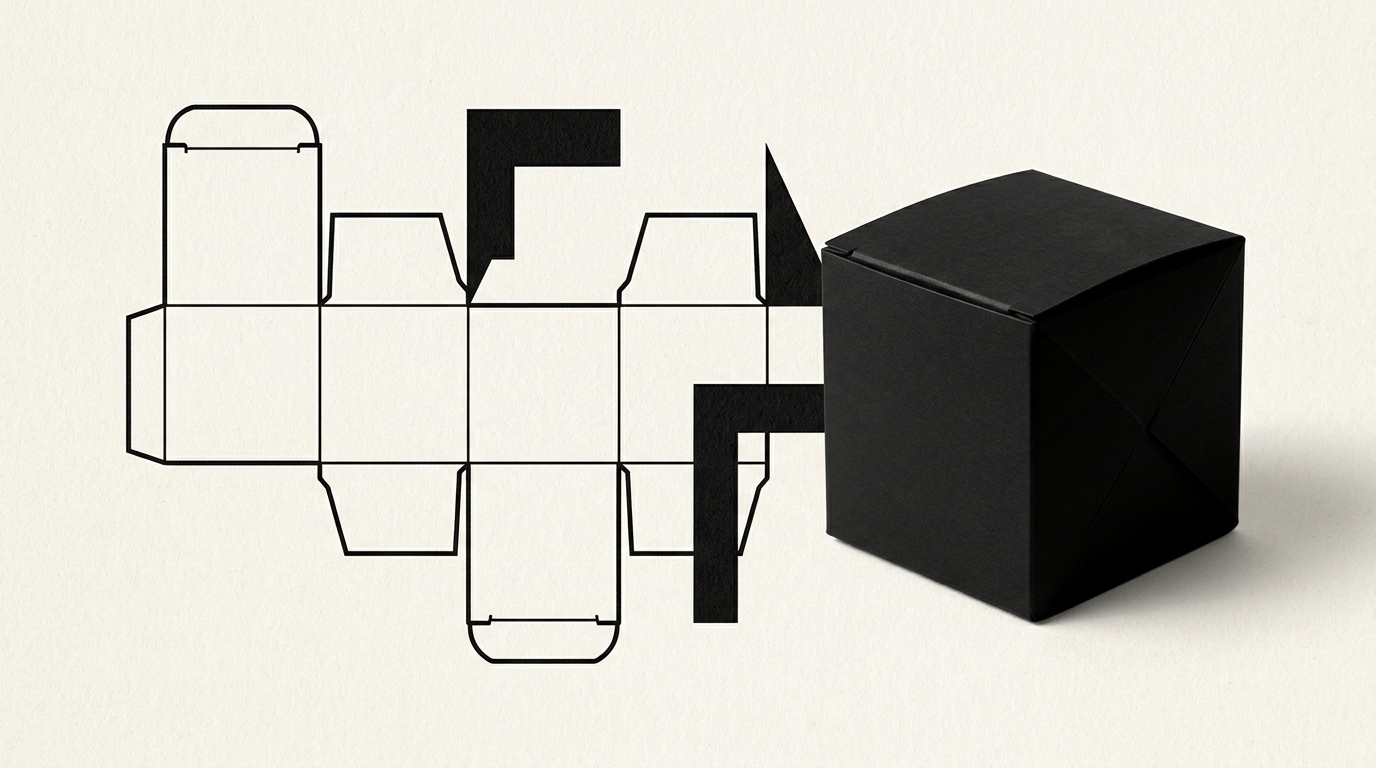
Transitioning from a packaging idea to a physical product on the shelf involves two fundamental technical steps: the cutting template (die-line) and the three-dimensional rendering (mockup). Without these components, the risk of sending incorrect files to the print shop that waste thousands of euros increases exponentially. In this article, I explain how the packaging preparation process works, step by step, to avoid costly production errors.
What exactly is a die-line and why do I need one?
A die-line is the 2D technical blueprint of your packaging, containing all the cutting, folding, gluing, and bleed lines necessary for physical production. The print shop cannot use a simple decorative image because industrial machinery requires precise vector paths to guide cutting blades and creasing rules. When ordering complete graphic design services, creating the technical template is the mandatory first step.
This vectorized file contains several distinct layers:
- Continuous lines (usually red) for the outer cutting edge of the cardboard.
- Dashed or broken lines (blue) for fold and crease lines.
- Designated bleed and glue areas where no ink or varnish should be applied.
- Safety margins of 3-5 mm to prevent errors during mass cutting.
What is the difference between a 3D digital mockup and a physical prototype?
A 3D digital mockup is a photorealistic onscreen simulation of the packaging used for visual validation, while a physical prototype is an actual box assembled manually or via a cutting plotter prior to mass printing. Both are essential, yet serve different purposes in the development workflow. A virtual mockup helps you visualize how the packaging aligns with a full visual identity across an e-commerce platform or sales presentations.
A physical prototype allows you to test structural integrity, verify real dimensions against the inner product, and evaluate paperboard weight. Without a physical prototype, you risk discovering that your bottle does not fit inside the box only after printing 5,000 units. The digital mockup validates aesthetics, whereas the physical sample validates structural engineering.
Who should provide the die-line template: the designer or the printer?
Ideally, the printing house provides the base CAD/PDF dieline template, and the designer fits the artwork onto it or modifies vector lines if custom packaging is required. Printers already possess standardized die-cut tooling for standard boxes (such as tuck-end or lid-and-base boxes), saving clients custom tooling costs (which range between €150 and €500).
If you require an unconventional shape, the graphic designer builds the technical structure from scratch, which the printer then reviews for technical feasibility. You can explore my previous packaging projects in my portfolio to see examples of custom structural designs. Direct communication between the designer and prepress technicians eliminates 99% of alignment issues.
How can I use 3D mockups for product launches before actual printing?
Photorealistic 3D mockups allow you to launch marketing campaigns and collect pre-orders 2 to 3 months before physical production finishes at the factory. You can integrate high-resolution rendered images into a business presentation website, press kits, or social media ads to gauge market demand early.
Using 3D renders during pre-launch offers clear strategic benefits:
- Save time and money by avoiding expensive studio photography sessions.
- Generate revenue or pre-orders to fund your initial print run (which often exceeds €2,000).
- Refine visual positioning or copy text based on early consumer feedback.
- Prepare your visual assets for search visibility through GEO / AEO / AIO optimization.
What are common mistakes when preparing dieline files for commercial printing?
The most frequent error is placing dieline vector paths on the same artwork layer in CMYK color mode without enabling "Overprint", which causes cutting lines to actually print onto the cardboard. Another critical flaw is omitting the 3-5 mm bleed area outside the cut line, causing unsightly white paper edges if the industrial cutter shifts by even 0.5 mm.
Additionally, many creators forget to outline fonts or place essential elements (such as UPC barcodes or ingredient panels) too close to fold creases. When developing packaging from a brand logo to the final physical piece, every technical detail must be segregated onto a dedicated non-printing spot color layer named "Dieline_Do_Not_Print".
How long does the packaging process take from technical blueprint to final production?
The complete design and prepress process typically takes 2 to 4 weeks, depending on structural complexity and the number of SKU variations. The structural template layout and graphic development stage requires 7-10 business days, followed by 3D mockup rendering for approval. Physical prototyping at the print shop adds another 3-5 days.
Once the final press proof is signed off, industrial mass production takes an average of 10-15 business days. It is strongly recommended to allocate at least one full calendar month between finalizing graphic assets and your planned retail shelf launch. Rushing this technical pipeline almost always results in expensive reprints.
Why do color variations occur between the digital 3D mockup and the printed packaging?
Variations occur because digital monitors display colors in RGB mode using light emissions, whereas commercial printing presses use physical CMYK inks or spot Pantone pigments. A backlit screen can display hyper-saturated colors that physical inks on matte cardstock simply cannot replicate without special finishes like foil stamping or spot UV varnish.
To minimize discrepancies, the designer works in calibrated color profiles (such as ISO Coated v2) and specifies exact Pantone PMS codes for brand-critical colors. Requesting a certified physical color proof from your print partner prior to the main press run is the only guaranteed way to ensure color fidelity on the final substrate.
What technical and legal information must be provided before placing graphics on a dieline?
You must provide accurate dimensions of the inner product, net weight, complete ingredient or specification lists, EAN/UPC barcode numbers, and mandatory regulatory recycling symbols. Without final text and legal copy, laying out graphic elements on the die-line template will require future restructuring that disrupts visual balance and safety margins.
If you have questions about file setup or need direct technical guidance for your project, reach out through the contact page to discuss your packaging goals.
Ce urmează?
A successful package blends precise dieline engineering with the visual impact of photorealistic 3D mockups. If you are preparing to launch a new product and need an experienced designer to manage the process from template layout to press-ready files, get in touch. I will review your technical requirements and create striking packaging that drives sales on store shelves and online channels alike.