5 min read
What Are Dielines and Packaging Mockups and How Do You Use Them?
A practical guide on moving from vector dielines to 3D mockups and print production, with concrete advice from an experienced graphic designer.
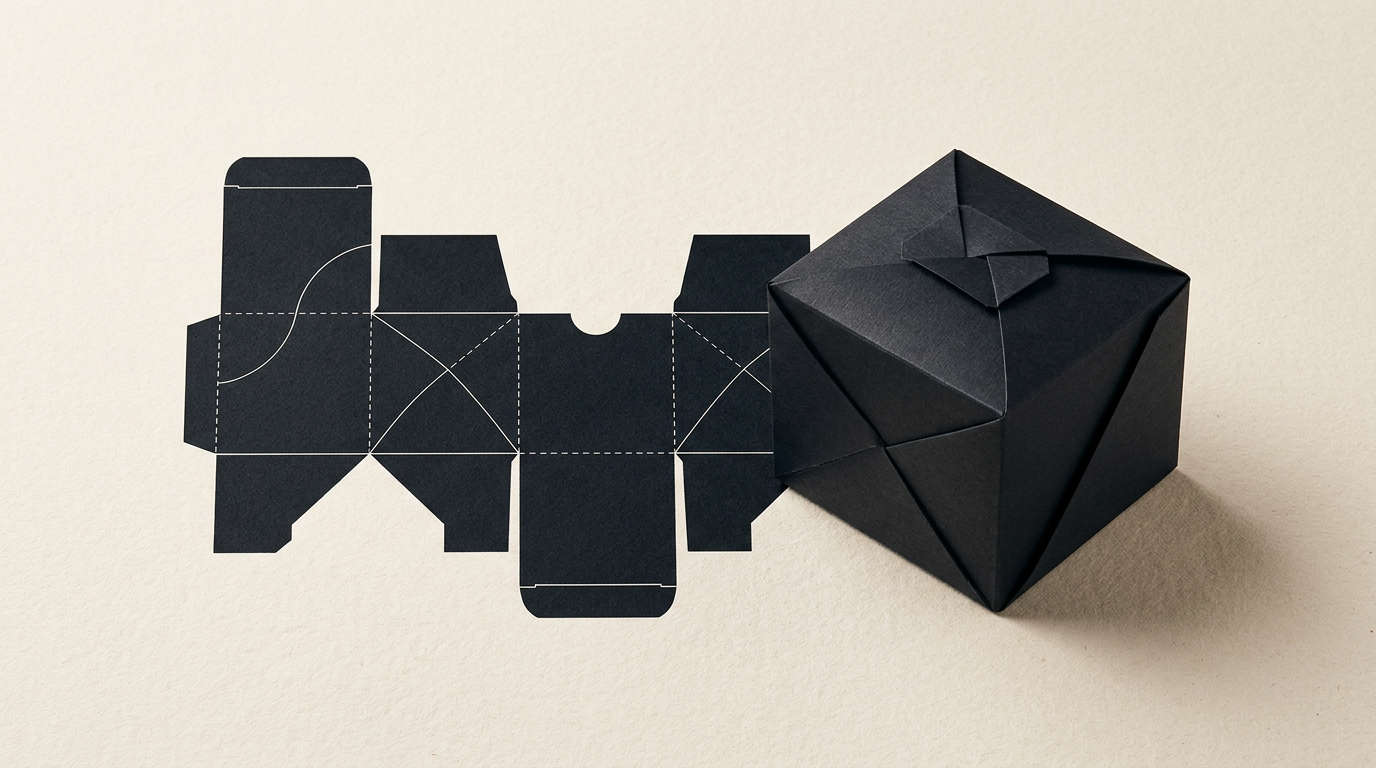
Moving a packaging design from an idea to the store shelf involves two fundamental technical stages: the vector dieline and the visual mockup. Without an accurate technical layout and a realistic 3D simulation, the risk of sending a package with wrong dimensions or text overlapping folds to the printer is huge. In this guide, I answer the most common questions I receive from clients about preparing packaging files for production.
What exactly is a dieline and why do I need one before printing?
A dieline is a 2D vector blueprint of flattened packaging that tells the print shop exactly where to cut, fold, crease, or glue the paperboard. Without this technical template, heavy printing die-cutting machinery cannot process your box shape. When providing graphic design services for packaging, the dieline serves as the foundation upon which we lay all artwork, branding elements, and mandatory legal copy. It contains separate layers for cut lines, crease lines, and bleed zones. In industrial manufacturing, a 1 mm discrepancy on a dieline can ruin an entire run of 5,000 boxes, which is why technical plans must always be validated before applying artwork.
What is the difference between a 3D mockup and a technical dieline?
The main difference is that a dieline is a production file meant for the print factory, whereas a 3D mockup is a visual simulation designed for business decision-making and marketing. The dieline is flat, technical, and contains precise mathematical measurements, remaining invisible on the final physical product. The 3D mockup is a photorealistic rendering of the assembled box, showing how panels fold, how light reflects off special finishes (spot UV, gold foil), and how a professional logo looks on the front flap. While the print shop works exclusively from the 2D vector file, you and your team need the mockup to approve visual proportions and start marketing before physical boxes exit the factory.
Who provides the dieline: the print shop or the graphic designer?
In 90% of cases, the print shop provides the standardized dieline because each packaging plant operates specific cutting dies or machinery with strict tolerances for paperboard thickness. However, if you need a custom box shape or bespoke display casing, a graphic designer can build the dieline from scratch using CAD software or Illustrator. Across my visual identity and packaging projects, I always request the technical dieline from the client's chosen printer first. If none exists, I draft the technical layout, produce a physical plotter prototype for testing, and secure print-engineer sign-off before mapping final graphics.
What technical and graphic elements must a proper dieline contain?
A professional dieline file must be organized on separate layers and clearly delineate all technical processing areas. A print-ready dieline must mandatorily include the following components:
- Cut lines (Die cut) drawn with a dedicated Spot Color (e.g., 100% Magenta) set to Overprint.
- Fold/crease lines (Crease / Fold) marked with dashed lines using another Spot Color (e.g., 100% Cyan).
- Bleed areas extending at least 3–5 mm beyond cut lines to prevent unprinted white edges.
- Glue zones left unprinted and free of varnish or ink to allow proper adhesive bonding.
- Paperboard grain direction and specific layer markings for foil stamping, embossing, or debossing.
Why do colors look different on a digital mockup compared to the printed product?
Colors differ because digital screens generate light using RGB color space, while printing presses rely on physical CMYK pigments or special Pantone inks. A 3D mockup displayed on an uncalibrated monitor will always look brighter and more saturated than a physical matte paperboard printed offset or digitally. Furthermore, substrate texture (recycled board, coated paper, corrugated flute) absorbs ink differently, altering visual perception. To eliminate unpleasant surprises, I use standardized color profiles (FOGRA39/51) during design and always recommend running a physical color proof on the actual material, even if the digital mockup looks flawless.
How much does full packaging design cost, from dieline to mockup?
The cost of a complete packaging project depends on structural complexity and the number of SKUs, typically ranging between €400 and €1,500. Developing a simple technical dieline (folding carton for cosmetics or pharma) along with graphic layout and a 3D mockup averages €400–€600. For a complex product line with 10 SKUs, special finishes (foil stamping, embossed UV), and structural transit optimization, investment reaches €1,200–€2,000. Before launching your project, you can review my portfolio to see real packaging examples and how dielines translate into finished product imagery.
What common mistakes occur when submitting dieline files to a printer?
The most expensive packaging mistakes stem from overlooked technical details and prepress rules. Here are the primary errors I systematically prevent in production:
- Placing dieline paths on artwork layers without Spot Color and Overprint attributes, causing cut lines to be printed directly on boxes.
- Placing critical text or brand logos too close to fold lines (less than the recommended 3 mm safety margin).
- Omitting bleed allowances, leading to unsightly white slivers along trimmed edges.
- Using low-resolution images (under 300 DPI) or leaving small typography as raster images instead of crisp vectors.
- Neglecting board thickness: during multiple folds, thick card stock requires 1.5–3 mm clearance allowances to close properly.
How does a 3D mockup help present a product on a website or online store?
A high-resolution 3D mockup successfully replaces expensive studio photography, providing flawless angles without unwanted shadows or reflections. When building a presentation website or e-commerce store for a consumer brand, 3D renders allow me to showcase products from angles impossible to capture consistently with a camera. Mockups can be rotated 360 degrees, animated for video ads, and used in pre-order campaigns long before mass manufacturing ends. Furthermore, for modern platforms, these digital assets can be optimized using GEO / AEO / AIO optimization techniques to ensure visibility across search engines and AI shopping assistants.
What's next?
If you have a new product requiring a sturdy packaging structure or want to redesign an existing box without printing errors, technical consultation is the logical next step. Send me your product dimensions or printer dieline via the contact page, and I will handle technical verification, artwork application, and render 3D mockups ready for print and marketing.